Not many pleasant things happened with the Google Maps integration on my blog recently
A few months ago, I started using the Google Maps API on my blog to share my flights, routes, future plans, and simply show the places I’ve visited. Until today, everything had been working perfectly. I was careful with my API limits, but today I received a warning message — especially related to the Directions API.
I was using two different APIs: the Maps JavaScript API and the Directions API. The first one is only used to display the map and draw markers and flight routes. The second one was responsible for drawing car routes. The problem was that the Directions API had already been called 8,231 times out of the 10,000 free limit, while the Maps JavaScript API was used only 287 times. After reaching 10,000 requests, Google automatically switches to the paid version and starts charging money.
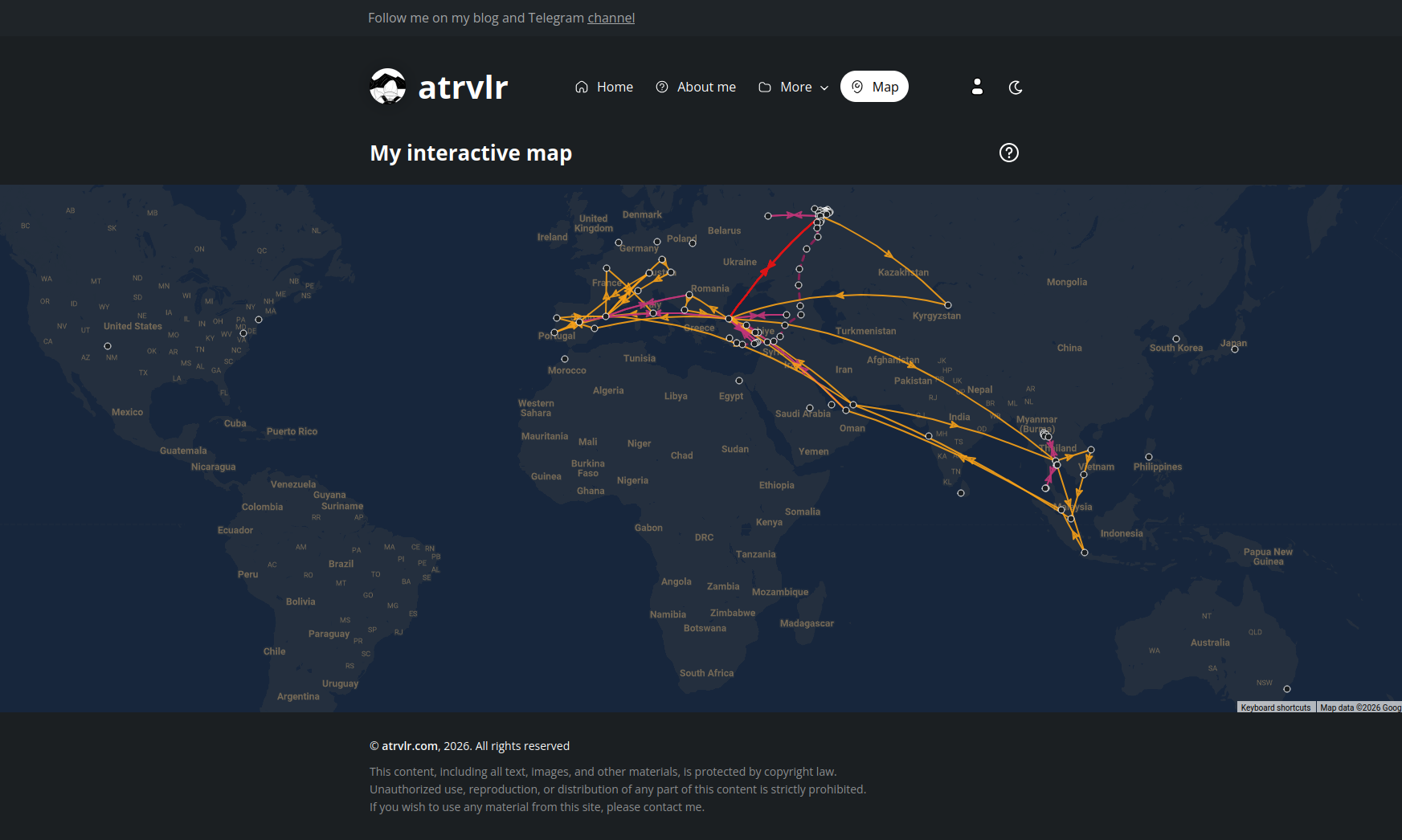
Because of that, I quickly disabled the Directions API and started developing an alternative solution for displaying car routes. Overall, the new version turned out to be even more convenient. I managed to add extra features for both car and flight routes, and now users can select routes and view them in more detail. The only downside is that car routes are now drawn with straight lines instead of following real roads. Honestly, I don’t think it matters much.
I also updated the map page itself. I added a dark mode, so the map now uses darker colors at night. This was very important for me because the bright map used to light up my whole room and strain my eyes. I started working on this during the New Year holidays, but I only managed to finish it and deploy it to the production server a few days ago. I also added new places I plan to visit — without routes for now.
I didn’t want to spend my weekend working on the blog and sitting in front of a laptop. I just wanted to rest a bit, watch some movies, and take more walks outside. The weather is actually quite nice, around −10°C. Unfortunately, the Google API limits ruined my plans, and I had to fix everything.
In my blog, I started using google maps API a few months later. To share my flights, routes, plans and just show my visited places. And until today everything was working well. I kept my API limits, but today I received a message about it. Especially about the directions API. Because I used two types of API: Maps JavaScript and Directions. First, it just for showing my map on my page and draw my markers, flights. The second API I used for drawing my car routes. And there my limits were called 8231 times instead of 10000. But my first type of API was called only 287 times instead of 10000. And after 10000 google will start use paid version of the API and send me bills to pay. So I quickly turned off directions for my map and started developing another version to show my car routes.
Overall, my new version of my car routes is more convenient than before. Because I could realize extra features for car and flight routes. Now everyone can select routes and watch it more detail. But unfortunately I have another inconvenient thing with car routes. Now, they draw with straight lines, not repeat real road lines. Honestly, I think it doesn't matter, even if there are not repeated road lines.
I also updated my map page. I added dark mode for the map. Now for dark mode map, also will take dark colors. It was very inconvenient for me because, during the nighttime it brightened my whole room and beat my eyes. So I started developing it during my New Year weekends, but I could finish it and push it to my prod server a few days ago. Plus, I added my new places where I want to go. Those places just without routes.
And I didn't want to spend my weekend with my blog and behind a laptop. I just wanted a bit of rest, watched movies, more walks in fresh air. Because the weather is pretty good, the temperature is -10 Celsius. But google API limits a bit ruined my plans and I was forced to fix it.
What you did well:
- The story is logical and easy to follow.
- You explain the technical problem clearly.
- The text feels natural and personal, not robotic.
- Good use of technical vocabulary (API, limits, routes, prod server).
Main problems:
- Sentences are often too long.
- Some phrases sound translated, not natural.
- Verb tenses and articles (a / the) are sometimes off.
- Repetition of words like API, routes, map.
2. Language feedback (important corrections)
- Not enough pleasant things happened with my Google map in my blog → Not many pleasant things happened with the Google Map on my blog.
Why:
- “with my Google map” → on my blog
- “Not enough pleasant things” sounds unnatural here
- Capitalize Google Maps
- In my blog, I started using google maps API a few months later. → On my blog, I started using the Google Maps API a few months ago.
Why:
- “in my blog” → on my blog
- “a few months later” = later than what? → a few months ago
- Capitalization matters
- And until today everything was working well. → Until today, everything was working well.
Or more natural:
- “Everything had been working well until today.”
- First, it just for showing my map on my page… → The first one is used to show the map on my page…
- And there my limits were called 8231 times → And there, my limits were reached 8,231 times” or The Directions API was called 8,231 times
- And after 10000 google will start use paid version → After 10,000 requests, Google starts using the paid version
- Honestly, I think it doesn't matter → Honestly, I don’t think it matters
- also will take dark colors → will also use dark colors
- beat my eyes → hurt my eyes” or strain my eyes
- I could finish it → I managed to finish it
- behind a laptop → in front of a laptop